
Monitors

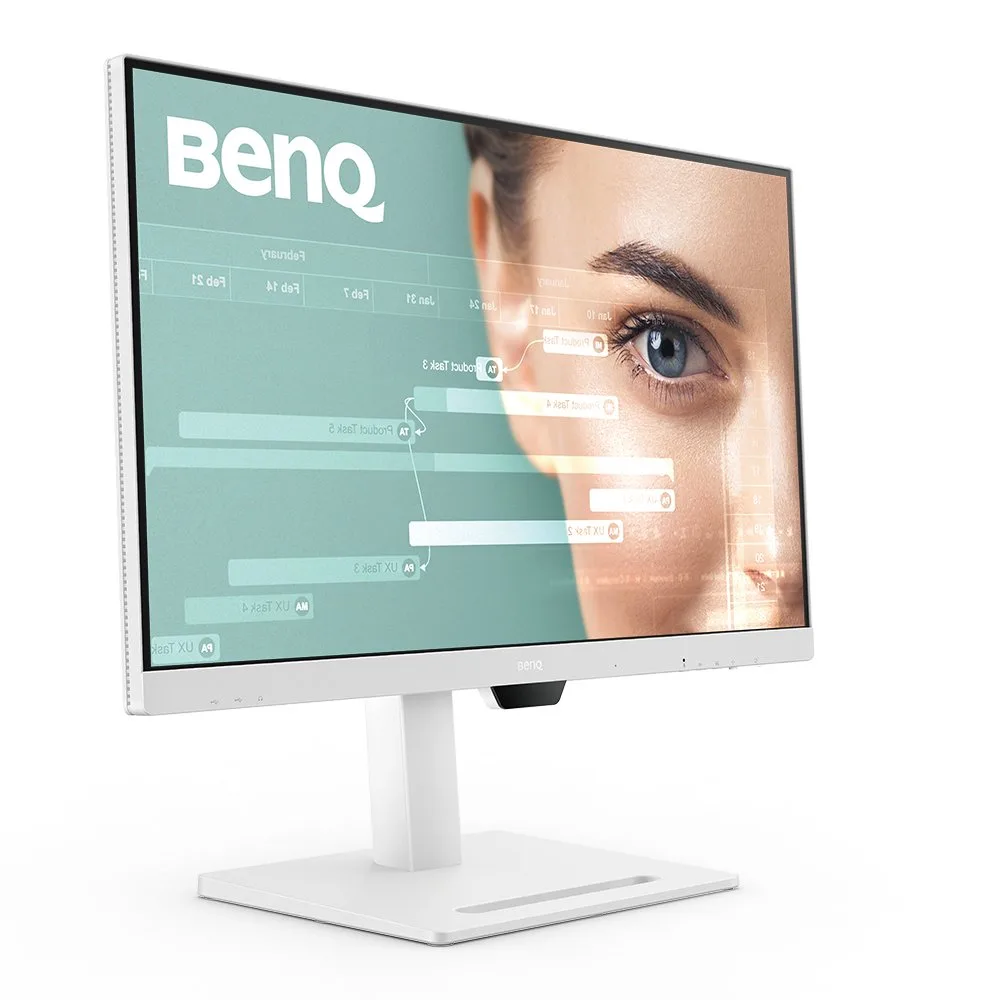
BenQ GW2486TC

verified Excellent

Best For

  • Users needing an ergonomic stand
  • Professionals requiring USB-C connectivity
  • Those after a budget-friendly monitor with good color
  • Coders and developers who need eye strain reduction during long sessions

Consider Carefully

  • Individuals requiring a bright display
  • Those needing a KVM switch

The Bottom Line

With an aggregated score of 85/100, the BenQ GW2486TC stands as a solid choice in the monitor market, particularly for those seeking a balance between performance and budget. What we found in our analysis is that this monitor excels in panel quality with its quick refresh rate, which was noted by five out of eleven sources. Its ergonomic stand, praised by four sources, offers height adjustment and pivot, making it a comfortable fit for extended work sessions. For developers and coders specifically, the dedicated Coding Mode reduces eye strain during long work sessions, a feature recognized by three sources, making this a genuinely practical pick for anyone spending hours in an IDE or terminal. The monitor's USB-C port with power delivery and DisplayPort over USB support, as highlighted by three sources, is a modern convenience that pairs well with a single-cable coding workstation. The BenQ GW2486TC also boasts excellent color accuracy and vibrancy, as recognized by three sources, ensuring a high-quality visual experience. Despite these strengths, there are a few reservations; the bulky 16A power plug may disrupt a clean desk setup for some, and the monitor isn't the brightest, as noted by one source.

Performance Breakdown

In-Depth Analysis

USB-C Connectivity 93

Unanimous consensus ยท 9 sources

65W USB-C power delivery and daisy-chaining support make this a strong single-cable docking solution. The missing KVM is the one gap that matters for multi-device users.

Key Takeaway

โ†’Single-laptop home office users get a genuinely clean setup here. Multi-computer users should factor in the cost of a KVM switch.

In-Depth Analysis

USB-C Connectivity

Unanimous consensus ยท 9 sources
93 / 100

Seven of nine sources highlighted the USB-C implementation, which is about as close to consensus as you get. The 65W power delivery is enough to charge most laptops while driving the display, and the daisy-chain capability means you can expand to a second monitor without adding another cable run to your desk. Tech Dreams specifically called out the daisy-chaining as a clutter reducer. TechRadar's note about no KVM is the real nuance here. If you're switching between two computers, you'll need a separate KVM switch or manual cable swapping. For single-laptop users, none of that matters.

USB-C with 65W power delivery reduces cable clutter significantly

โ€” m.dailyhunt.in

Where Reviewers Disagree

The USB-C feature set is strong, but the absence of KVM means anyone running two machines still has a cable management problem to solve.

What Reviewers Say

"USB-C connectivity simplifies cable management and supports 65W power delivery"

devicenext.com

"USB-C provides video, power delivery, and data in one cable"

Review-rating

"Daisy-chain capability enables easy multi-monitor expansion"

m.dailyhunt.in

"Ideal for home office workers prioritizing USB-C single-cable setups"

m.dailyhunt.in

Strengths

USB-C connectivity simplifies cable management and supports 65W power delivery
7 of 9 sources agree
  • devicenext.com โ€” high confidence
  • pcmag.com โ€” high confidence
  • m.dailyhunt.in โ€” medium
  • Monitornerds โ€” medium
  • Review-rating โ€” medium
  • TV Chef โ€” medium
  • TrendPunk - Product Reviews โ€” low
Solid office-oriented features like USB-C and eye comfort viewing modes
2 of 9 sources agree
  • techradar.com โ€” high confidence
  • Review-rating โ€” medium
Daisy-chain capability enables easy multi-monitor expansion
2 of 9 sources agree
  • m.dailyhunt.in โ€” medium
  • Tech Dreams โ€” medium

Nuances

Ideal for home office workers prioritizing USB-C single-cable setups
2 of 9 sources agree
  • m.dailyhunt.in โ€” medium
  • Review-rating โ€” medium
Good fit for multi-monitor users leveraging daisy-chain functionality
1 of 9 sources agree
  • m.dailyhunt.in โ€” medium
Suitable for use with laptops and smartphones
1 of 9 sources agree
  • Tech Dreams โ€” medium

Eye Care Features 93

Unanimous consensus ยท 6 sources

Six sources agree this is one of the GW2486TC's strongest suits. TรœV-certified flicker-free tech, Low Blue Light, and a dedicated Coding Mode make it a legitimate pick for anyone logging long hours at a screen.

Key Takeaway

โ†’If eye fatigue or light sensitivity is a real concern for you, this monitor's certification and dedicated modes are worth the price of admission.

In-Depth Analysis

Eye Care Features

Unanimous consensus ยท 6 sources
93 / 100

One Reddit reviewer specifically flagged it as helpful for migraine sufferers, which is a more concrete claim than the usual 'easy on the eyes' filler. The Coding Mode and ePaper Mode aren't just marketing checkboxes. Four sources independently called them out as genuinely useful for extended sessions. PCMag noted it's 'suitable for long-duration viewing comfort,' and Review-rating flagged it as appropriate for users sensitive to eye strain. The TรœV certification gives the flicker-free claim third-party backing, which matters. No source pushed back on any of this.

Easy on the eyes, potentially reducing migraines

โ€” Reddit

What Reviewers Say

"Coding Mode reduces eye strain for long work sessions"

devicenext.com

"Easy on the eyes, potentially reducing migraines"

Reddit

"TรœV-certified Flicker-Free and Low Blue Light eye protection"

m.dailyhunt.in

"Ideal for users with migraines due to its no-flicker feature and color performance"

Reddit

Strengths

Coding Mode reduces eye strain for long work sessions
4 of 6 sources agree
  • devicenext.com โ€” high confidence
  • m.dailyhunt.in โ€” medium
  • Reddit โ€” medium
  • Review-rating โ€” medium
TรœV-certified Flicker-Free and Low Blue Light eye protection
1 of 6 sources agree
  • m.dailyhunt.in โ€” medium

Nuances

Eye-care technology is essential for maintaining eye health during long hours of work
3 of 6 sources agree
  • devicenext.com โ€” high confidence
  • pcmag.com โ€” high confidence
  • Review-rating โ€” medium
Strong choice for developers using Coding Mode for extended sessions
2 of 6 sources agree
  • m.dailyhunt.in โ€” medium
  • Monitornerds โ€” medium
Ideal for users with migraines due to its no-flicker feature and color performance
1 of 6 sources agree
  • Reddit โ€” medium

Display & Color Quality 91

Strong consensus ยท 11 sources

99% sRGB and wide IPS viewing angles earn consistent praise across 11 sources, but TechRadar specifically warns against using it for color correction work. Know the difference.

Key Takeaway

โ†’For office work, coding, and casual creative tasks, the color quality is genuinely good. Professional colorists and print designers should look at a wider-gamut panel.

In-Depth Analysis

Display & Color Quality

Strong consensus ยท 11 sources
91 / 100

PCMag's 99% sRGB measurement is the anchor number here, and multiple sources built on it. Monitornerds called the colors 'excellent' and 'vibrant,' OZONE TECH flagged it as suitable for content creators, and TrendPunk pointed to graphic design as a use case. That's a lot of enthusiasm. TechRadar is the outlier, explicitly saying it's not recommended for color correction and editing due to limited color coverage. That's not a contradiction, it's a calibration. For general productivity, coding, and casual creative work, the color accuracy is more than adequate. For professional color grading or print-accurate work, it falls short. The minor backlight bleed on the bottom edge flagged by Monitornerds is worth knowing but didn't affect any scores significantly.

99% sRGB color coverage

โ€” pcmag.com

Where Reviewers Disagree

Most sources recommend it for creative work, but TechRadar draws a clear line at color correction and editing, where the limited coverage becomes a real constraint.

What Reviewers Say

"IPS panel maintains color consistency at wide viewing angles"

m.dailyhunt.in

"Suitable for color-critical work with its high color accuracy"

Monitornerds

"Superior contrast ratio for an IPS panel"

pcmag.com

"Ideal for graphic design due to color accuracy"

TrendPunk - Product Reviews

Strengths

23.8-inch IPS display offers wide viewing angles and color accuracy
4 of 11 sources agree
  • devicenext.com โ€” high confidence
  • m.dailyhunt.in โ€” medium
  • Monitornerds โ€” medium
  • Review-rating โ€” medium
Suitable for color-critical work with its high color accuracy
3 of 11 sources agree
  • Monitornerds โ€” medium
  • OZONE TECH โ€” medium
  • TrendPunk - Product Reviews โ€” low
Excellent color accuracy with vibrant colors
2 of 11 sources agree
  • pcmag.com โ€” high confidence
  • Tech Dreams โ€” medium
Superior contrast ratio for an IPS panel
1 of 11 sources agree
  • pcmag.com โ€” high confidence

Nuances

Recommended for coding and document-heavy work environments
3 of 11 sources agree
  • Reddit โ€” medium
  • Review-rating โ€” medium
  • TV Chef โ€” medium
Ideal for professional work and media consumption
2 of 11 sources agree
  • Tech Dreams โ€” medium
  • OZONE TECH โ€” medium
Not recommended for color correction and editing due to limited color coverage
1 of 11 sources agree
  • techradar.com โ€” high confidence
Great for general use with accurate colors
1 of 11 sources agree
  • pcmag.com โ€” high confidence

Ergonomics & Stand 87

Strong consensus ยท 8 sources

Seven of eight sources praise the full adjustability range, but two flag wobble at the stand's upper height limits. It's good, not perfect.

Key Takeaway

โ†’For a desk-bound office setup, the ergonomics are excellent. If you need the stand at maximum height regularly, the wobble is worth knowing about before you buy.

In-Depth Analysis

Ergonomics & Stand

Strong consensus ยท 8 sources
87 / 100

Full height, tilt, swivel, and pivot support is rare at this price point, and reviewers noticed. The portrait mode pivot got specific callouts from developers who use it for reading code vertically. That's a real workflow benefit, not a spec-sheet feature. The wobble issue is the one crack in the armor. Review-rating noted that 'stand stability decreases at higher height settings,' and m.dailyhunt.in echoed it. It's not a dealbreaker, but if you work at a standing desk and crank the monitor up high, expect some sway. TechRadar called it best suited for business use, which tracks.

Stand stability decreases at higher height settings

โ€” Review-rating

Where Reviewers Disagree

Seven sources love the adjustability range, but two specifically flag stability issues at the top of the height range, which is exactly where standing desk users need it most.

What Reviewers Say

"Ergonomics allow full adjustability, including height, pivot, tilt, and swivel"

devicenext.com

"Extensive ergonomic adjustments including pivot, tilt, swivel, height"

m.dailyhunt.in

"Adjustable portrait mode increases productivity when reading code"

devicenext.com

"Ideal for remote workers needing ergonomic daily-use display"

Review-rating

Strengths

Ergonomics allow full adjustability, including height, pivot, tilt, and swivel
7 of 8 sources agree
  • techradar.com โ€” high confidence
  • devicenext.com โ€” high confidence
  • pcmag.com โ€” high confidence
  • m.dailyhunt.in โ€” medium
  • Monitornerds โ€” medium
  • TV Chef โ€” medium
  • OZONE TECH โ€” medium
Adjustable portrait mode increases productivity when reading code
1 of 8 sources agree
  • devicenext.com โ€” high confidence
Height-adjustable stand enables flexible ergonomic positioning
1 of 8 sources agree
  • Review-rating โ€” medium

Nuances

Best suited for business use with its comfortable ergonomics and eye-care features
1 of 8 sources agree
  • techradar.com โ€” high confidence
Ideal for coders and programmers due to portrait mode and eye-care features
1 of 8 sources agree
  • devicenext.com โ€” high confidence
Ideal for remote workers needing ergonomic daily-use display
1 of 8 sources agree
  • Review-rating โ€” medium
Enhances collaboration with multiple adjustments
1 of 8 sources agree
  • OZONE TECH โ€” medium

Refresh Rate & Performance 86

Unanimous consensus ยท 6 sources

100Hz at 1080p is smooth enough for productivity and casual gaming, but the HDMI 1.4 port caps your options if you ever want to push beyond Full HD.

Key Takeaway

โ†’If 1080p at 100Hz covers your needs, this delivers it cleanly. Serious gamers or anyone planning to upgrade to a higher-resolution source should look elsewhere.

In-Depth Analysis

Refresh Rate & Performance

Unanimous consensus ยท 6 sources
86 / 100

All six sources agree on the 100Hz figure, and for the target audience, it's sufficient. TechRadar called it a 'quick refresh rate' and PCMag noted it delivers 'smoother video.' m.dailyhunt.in was the most specific about the ceiling, flagging that HDMI 1.4 and DisplayPort 1.2 limit higher refresh rates beyond Full HD. That's a real constraint if your workflow ever evolves toward higher resolutions. For casual gamers and productivity users, 100Hz at 1080p is a meaningful step up from 60Hz without requiring a premium GPU. Nobody called this a gaming monitor, and nobody should.

Suitable for casual gamers wanting 100Hz without premium pricing

โ€” m.dailyhunt.in

Where Reviewers Disagree

The 100Hz refresh rate is a genuine selling point, but the older port standards mean you're locked into Full HD to get there.

What Reviewers Say

"Full HD resolution and 100Hz refresh rate for sharp visuals and smooth performance"

devicenext.com

"100Hz refresh rate delivers smoother visuals for gaming and movies"

m.dailyhunt.in

"Suitable for casual gamers wanting 100Hz without premium pricing"

m.dailyhunt.in

"Smooth performance with 100 Hz refresh rate"

TrendPunk - Product Reviews

Strengths

Full HD resolution and 100Hz refresh rate for sharp visuals and smooth performance
6 of 6 sources agree
  • techradar.com โ€” high confidence
  • devicenext.com โ€” high confidence
  • pcmag.com โ€” high confidence
  • m.dailyhunt.in โ€” medium
  • Tech Dreams โ€” medium
  • TrendPunk - Product Reviews โ€” low

Nuances

Excellent for media consumption and light gaming
2 of 6 sources agree
  • devicenext.com โ€” high confidence
  • m.dailyhunt.in โ€” medium

Design & Build Quality 81

Strong consensus ยท 8 sources

The matte white finish and clean aesthetic get consistent praise, but the bulky power plug, absent cable management, and clunky OSD controls are real friction points.

Key Takeaway

โ†’The design looks good in photos and holds up in person, but the missing cable management and clunky controls will bother anyone who cares about a tidy setup.

In-Depth Analysis

Design & Build Quality

Strong consensus ยท 8 sources
81 / 100

Three sources independently praised the modern design, and Monitornerds specifically called out the matte white finish as a differentiator. Tool-free assembly in minutes is a small but genuine convenience. The problems are specific and annoying. m.dailyhunt.in flagged the Type M power plug as unnecessarily bulky, which is an odd design choice for a monitor marketed on clean desk setups. TechRadar noted no cable management, which compounds the plug issue. Monitornerds called the OSD controls 'clunky,' a complaint that shows up often enough with BenQ monitors to be a pattern. No dedicated remote makes adjusting settings more tedious than it should be. The build feels solid, but the details undercut the premium aesthetic.

Bulky Type M power plug increases desk footprint unnecessarily

โ€” m.dailyhunt.in

Where Reviewers Disagree

The monitor is marketed on clean aesthetics and desk organization, but the bulky power plug and absent cable management work directly against that promise.

What Reviewers Say

"Sleek, modern design integrates well into home offices"

devicenext.com

"Modern design with matte white finish"

Monitornerds

"Tool-free assembly takes minutes without any external tools"

m.dailyhunt.in

"Bulky Type M power plug increases desk footprint unnecessarily"

m.dailyhunt.in

Strengths

Sleek, modern design integrates well into home offices
3 of 8 sources agree
  • devicenext.com โ€” high confidence
  • Monitornerds โ€” medium
  • TV Chef โ€” medium
Very affordable
1 of 8 sources agree
  • techradar.com โ€” high confidence
Tool-free assembly takes minutes without any external tools
1 of 8 sources agree
  • m.dailyhunt.in โ€” medium
Sturdy build quality and stable stand
1 of 8 sources agree
  • Monitornerds โ€” medium

Nuances

Affordable option for creative professionals
3 of 8 sources agree
  • techradar.com โ€” high confidence
  • pcmag.com โ€” high confidence
  • TrendPunk - Product Reviews โ€” low
Good for multitasking with multiple monitor setup
1 of 8 sources agree
  • pcmag.com โ€” high confidence
Multiple display sizes available for different workspaces
1 of 8 sources agree
  • TV Chef โ€” medium

Built-in Audio & Mic 79

Strong consensus ยท 4 sources

Four sources agree the built-in speakers and noise-cancelling mic are functional for video calls. Nobody is calling them impressive.

Key Takeaway

โ†’Good enough for daily video calls, not good enough to replace dedicated audio gear. Set expectations accordingly.

In-Depth Analysis

Built-in Audio & Mic

Strong consensus ยท 4 sources
79 / 100

The bar for built-in monitor audio is low, and the GW2486TC clears it for its intended use case. Review-rating and TrendPunk both specifically called out the noise-cancelling mic as useful for client calls, which is the right framing. Monitornerds noted the speakers work for 'seamless conferencing.' No source tested these for music or media consumption, which tells you something. This is a video call feature, not an audio feature. If you're on Teams or Zoom all day and don't want a separate webcam mic cluttering your desk, it earns its place. If you care about audio quality for anything else, budget for external speakers.

Built-in noise-cancelling microphone reduces background interference

โ€” Review-rating

What Reviewers Say

"Functional built-in speakers and noise-cancellation microphone for casual use"

devicenext.com

"Convenient built-in speakers for seamless conferencing"

Monitornerds

"Built-in noise-cancelling microphone reduces background interference"

Review-rating

"Convenient for client calls with noise-canceling mic"

TrendPunk - Product Reviews

Strengths

Functional built-in speakers and noise-cancellation microphone for casual use
2 of 4 sources agree
  • devicenext.com โ€” high confidence
  • Monitornerds โ€” medium
Suits professionals in frequent video meetings with integrated mic
2 of 4 sources agree
  • Review-rating โ€” medium
  • TrendPunk - Product Reviews โ€” low

Brightness & Visibility 64

Strong consensus ยท 3 sources

At 250 nits maximum, this monitor struggles in bright rooms. Two sources flag it, and TechRadar's blunt 'not all that bright' sums it up.

Key Takeaway

โ†’If your workspace has strong ambient light or direct sunlight, this monitor will frustrate you. In a controlled indoor environment, the brightness is workable.

In-Depth Analysis

Brightness & Visibility

Strong consensus ยท 3 sources
64 / 100

This is the GW2486TC's clearest weakness. 250 nits is below average for a modern office monitor, and both TechRadar and m.dailyhunt.in called it out directly. The Brightness Intelligence feature sounds like a solution but isn't. m.dailyhunt.in specifically noted 'sluggish responsiveness' in how it adapts to ambient light, which makes it more of a liability than a feature. The practical takeaway is simple: this monitor is designed for controlled indoor lighting. A desk near a window with afternoon sun will expose the limitation fast. For dim or windowless office environments, it's a non-issue.

Not all that bright

โ€” techradar.com

Where Reviewers Disagree

The Brightness Intelligence feature is supposed to compensate for ambient light changes, but reviewers found it too slow to be useful, making the low peak brightness harder to overlook.

What Reviewers Say

"250-nit maximum brightness struggles in brightly lit environments"

m.dailyhunt.in

"Not all that bright"

techradar.com

"Brightness Intelligence Technology shows sluggish responsiveness"

m.dailyhunt.in

"Best for indoor environments with controlled lighting conditions"

m.dailyhunt.in

Nuances

Lacks cable management and brightness, which may impact setup and visibility
1 of 3 sources agree
  • techradar.com โ€” high confidence
Best for indoor environments with controlled lighting conditions
1 of 3 sources agree
  • m.dailyhunt.in โ€” medium

Specifications & Verdict

23.8 inches Size
IPS Panel
100 Refresh Rate
USB-C Connectivity
Connectivity
Usb Ports
2
Video Inputs
USB-C
Display
Panel Type
IPS
Pixel Refresh Rate
100
Resolution
1920 by 1080
Size
23.8 inches
Ergonomics
Vesa Display HDRLevel
NA
Features
Adaptive Sync
NA
Warranty
3 years
Performance
Rated Contrast Ratio
1300:1
Rated Screen Luminance
250
Physical
Dimensions
19.7 by 21.3 by 7.3 inches
Weight
13.7 pounds

Our Verdict

The BenQ GW2486TC is a great pick for users who value an ergonomic design, good color accuracy, and modern connectivity options without breaking the bank. Coders in particular get a purpose-built advantage from the Coding Mode, which targets eye strain reduction across long sessions. However, it may not be the best choice for those who need a brighter screen or are looking for a KVM switch.

Customer Reviews Amazon

4.4

269 reviews

Exceeded Expectations!! โค๏ธโค๏ธโค๏ธโค๏ธโค๏ธ

Honey โ€ข 2026-01-08
U wont feel u compromised with the quality… it’s A Class from built to screen.. nothing short of so called retina display.. visuals are crisp & great looking.. i felt like i got iMac but with way superior mount stand which can adjust tilt, height… also rotate.. Stand itself is of very high quality standards… 24" is a perfect size for desktop experience in my opinionOnly downside I felt is speakers quality.. it sounds like 90’s TV.. if that’s a concern.. get a budget pair of desktop speakers or Alexa

Increible la calidad y el precio

Cliente de Kindle โ€ข 2025-11-18
Me encanto, la entrega super rapida, facil de instalar y se ve super bien. Lo mรกs importante no me lastima la vista.

wish I bought 2 - one for my wife and one for me

Joeboy V โ€ข 2026-01-08
sleek looking, great resolution, and we save on a plug. USBC power delivery is awesome

Excelente para home office

Memo Vital โ€ข 2025-10-07
Para trabajar es un 10/10, muy fรกcil de instalar, se ve muy bien con una mac y el puerto USB-C tambiรฉn la carga, ya no se necesita un cable extra en el escritorio.El micrรณfono se escucha decente para juntas en zoom.A veces tambiรฉn le conecto la play y en general se ve bien y las bocinas igual son decentes, estoy pensando en pedir otro mรกs.
Show all 5 reviews

Let there be sight

B. Hedley โ€ข 2025-09-28
Not as bright as I would like but still a godsend for my failing vision. Excelleny adjunct to my iPad Pro and very easy to set up. The build quality seems very high as I would expect fom BenQ. Great product at a very sharp price.

Reviews shown are from Amazon customers and do not reflect our editorial assessment.

Reader Questions

Specific questions about the BenQ GW2486TC, answered only from what reviewers reported.

01Can I connect a laptop with a single USB-C cable and charge it at the same time?

Yes. The USB-C port supports video, data, and 65W power delivery, so a single cable handles display output and laptop charging while reducing cable clutter.

3 sources “USB-C port with power delivery and DisplayPort over USB support” — pcmag.com

02How is the color accuracy, and is it good enough for graphic design work?

Reviewers rated color accuracy highly, describing the display as vibrant and consistent. At least one source specifically called it ideal for graphic design.

3 sources “Excellent color accuracy and vibrancy” — Monitornerds

03Is the 100Hz refresh rate a meaningful upgrade for everyday use?

Reviewers consistently noted smoother visuals compared to standard 60Hz panels, with the 100Hz rate benefiting both video playback and gaming. Multiple sources flagged it as one of the monitor's standout features.

3 sources “100Hz refresh rate for smoother video” — pcmag.com

04Are there any practical downsides to be aware of before buying?

Two issues came up across reviews. The monitor is not particularly bright, which could be a concern in well-lit rooms. The bundled power plug is also bulky, which can disrupt a clean desk setup.

3 sources “Not all that bright” — techradar.com

Sources & Methodology

Every score is built on evidence. This review synthesizes 13 independent sources โ€” expert publications, video reviews, and community discussions โ€” weighted by credibility, depth, and relevance.

article 6 Expert Reviews
play_circle 4 Video Reviews
forum 1 Community Discussions
science Our Methodology
Show detailed source analysis โ†“

Expert Reviews

techradar.com
Top 4/5-point

The BenQ GW2486TC Eye-Care Monitor is praised for its affordability and ergonomics, offering a comfortable viewing experience with a wide range of adjustments. It features USB-C with power delivery and eye-care viewing modes to minimize eye strain, making it suitable for extended use. However, it lacks cable management and brightness, which could be a drawback for some users.

Strengths

  • +Very affordable
  • +Versatile ergonomics
  • +Quick refresh rate
  • +Solid office-oriented features like USB-C and eye comfort viewing modes

Weaknesses

  • โˆ’No cable management
  • โˆ’Not all that bright
  • โˆ’No KVM
Credibility: High ยท 2,402 words
Read full review โ†’
pcmag.com
Top 4.5/5-point

The BenQ GW2486TC offers a compelling feature set for a budget monitor, including a superior contrast ratio, high refresh rate, and ergonomic stand. Its 100Hz refresh rate and 99% sRGB color coverage provide a smoother viewing experience and accurate colors. The monitor also boasts a USB-C port with power delivery, a DisplayPort-out for daisy-chaining, and built-in speakers.

Strengths

  • +Superior contrast ratio for an IPS panel
  • +100Hz refresh rate for smoother video
  • +99% sRGB color coverage
  • +Ergonomic stand with height adjustment and pivot
Credibility: Moderate ยท 1,151 words
Read full review โ†’
devicenext.com

The BenQ GW2486TC is praised for its advanced eye-care features and flexible display modes, making it an excellent choice for home office setups, particularly for coders and programmers. Its sleek design, Full HD resolution, and 100Hz refresh rate provide sharp visuals and smooth performance. The monitor stands out with its Coding Mode and ergonomic adjustability, including portrait mode, enhancing productivity. USB-C connectivity simplifies cable management, and the eye-care technology, including Flicker-Free and Low Blue Light, ensures comfort during extended work sessions.

Strengths

  • +Sleek, modern design integrates well into home offices
  • +23.8-inch IPS display offers wide viewing angles and color accuracy
  • +Full HD resolution and 100Hz refresh rate for sharp visuals and smooth performance
  • +Coding Mode reduces eye strain for long work sessions

Weaknesses

  • โˆ’Bulky 16A power plug may disrupt clean desk setup
Credibility: Moderate ยท 539 words
Read full review โ†’
m.dailyhunt.in

The BenQ GW2486TC (โ‚น14,998) offers a compelling package for home office users with its 23.8-inch IPS panel, 100Hz refresh rate, and versatile USB-C connectivity with 65W power delivery. Tool-free assembly and extensive ergonomic adjustments (pivot, tilt, swivel, height) enhance usability, though the stand exhibits some wobble at extreme positions. The 250-nit brightness limitation and bulky Type M power plug are notable drawbacks. Brightness Intelligence Technology shows inconsistent responsiveness. Strong eye-care features with TรœV certification and specialized modes for coding and reading add value for extended use.

Strengths

  • +USB-C with 65W power delivery reduces cable clutter significantly
  • +100Hz refresh rate delivers smoother visuals for gaming and movies
  • +Tool-free assembly takes minutes without any external tools
  • +Extensive ergonomic adjustments including pivot, tilt, swivel, height

Weaknesses

  • โˆ’250-nit maximum brightness struggles in brightly lit environments
  • โˆ’Bulky Type M power plug increases desk footprint unnecessarily
  • โˆ’Brightness Intelligence Technology shows sluggish responsiveness
  • โˆ’Stand feels wobbly when adjusted to extreme positions
Credibility: Moderate ยท 1,276 words
Read full review โ†’
Monitornerds

The BenQ GW2486TC is a 24-inch IPS monitor with a modern design and a plethora of connectivity options, making it an enticing choice for tech-savvy users. It boasts a 1920 x 1080 FHD resolution, a 100Hz refresh rate, and a 5ms response time, ensuring smooth performance. The monitor's color accuracy and vibrancy are impressive, covering 100% sRGB and 92% of DCI-P3, with a deltaE average of 1.14 out of the box. Its build quality is excellent, and the stand offers multiple adjustments for user comfort.

Strengths

  • +Modern design with matte white finish
  • +Generous connectivity options including USB-C
  • +Excellent color accuracy and vibrancy
  • +Sturdy build quality and stable stand

Weaknesses

  • โˆ’Clunky OSD controls with multiple key processes
  • โˆ’Minor backlight leaks on the bottom edge
Credibility: Moderate ยท 1,333 words
Read full review โ†’
Review-rating
90

Designed for extended office work, this 24-inch IPS monitor combines ergonomic flexibility with practical connectivity. The height-adjustable stand allows personalized positioning, while USB-C consolidates video, power, and data into a single cable. Brightness Intelligence automatically adapts to ambient lighting, and the integrated noise-cancelling microphone enhances video call clarity. Eye-care technology reduces strain during long sessions. Users consistently praise the crisp display and microphone quality, though some report stability concerns when the stand is fully extended. Overall, it serves remote workers and professionals seeking comfort without complexity.

Strengths

  • +Height-adjustable stand enables flexible ergonomic positioning
  • +IPS panel delivers consistent color and clarity
  • +USB-C provides video, power delivery, and data in one cable
  • +Brightness Intelligence adapts to ambient light automatically

Weaknesses

  • โˆ’Stand stability decreases at higher height settings
Credibility: Low ยท 2,871 words
Read full review โ†’

Video Reviews

Tech Dreams video review thumbnail
Tech Dreams The BenQ GW2486TC monitor is praised for its stylish design and โ€ฆ

The BenQ GW2486TC monitor is praised for its stylish design and excellent color accuracy, making it suitable for both professional work and media consumption. It features an IPS panel with 99% sRGB color gamut, providing vibrant and lively colors. The monitor also boasts a 5ms response time, 250 nits brightness, and 100Hz refresh rate, enhancing the overall viewing experience. Additionally, it includes a USB-C port with 65W power delivery, allowing for simultaneous charging and data transfer, and a DP out port for daisy-chaining monitors to reduce cable clutter.

  • โ†’Ideal for professional work and media consumption
  • โ†’Excellent color accuracy with vibrant colors
  • โ†’Reduces cable clutter with daisy-chaining feature
  • โ†’Suitable for use with laptops and smartphones
  • โ†’Enhances the viewing experience with fast response time and high refresh rate
Video thumbnail
TV Chef video review thumbnail
TV Chef The BenQ GW2486TC is a 24-inch Full HD IPS display tailored for office โ€ฆ

The BenQ GW2486TC is a 24-inch Full HD IPS display tailored for office and productivity users. It offers adaptive brightness, eye care mode, coding mode, a built-in noise-canceling microphone, daisy chaining capabilities, and USB Type-C connectivity. The monitor's 250 nits brightness and 5ms response time ensure clear visuals. The stand is highly adjustable, supporting height, tilt, swivel, and rotation, enhancing user comfort and flexibility.

  • โ†’Ideal for office and productivity tasks
  • โ†’Multiple display sizes available for different workspaces
  • โ†’USB Type-C simplifies cable management
  • โ†’Versatile stand offers ergonomic adjustments
  • โ†’White color scheme for a clean, modern look
Video thumbnail
OZONE TECH video review thumbnail
OZONE TECH The BenQ GW2486TC offers a solid build quality with a heavy metal โ€ฆ

The BenQ GW2486TC offers a solid build quality with a heavy metal stand and multiple ergonomic adjustments, making it suitable for various professional needs. Its 100Hz refresh rate provides a better experience than 60Hz monitors, enhancing visual performance for tasks like coding, programming, and color grading. The monitor's modern ergonomic design and premium materials ensure a comfortable and stylish addition to any workspace.

  • โ†’Ideal for content creators and graphic designers
  • โ†’Reduces fatigue with adjustable ergonomics
  • โ†’Suitable for coding, programming, and color grading
  • โ†’Enhances collaboration with multiple adjustments
  • โ†’Adds a premium touch to any desk setup
Video thumbnail
TrendPunk - Product Reviews video review thumbnail
TrendPunk - Product Reviews The BenQ GW2486TC monitor offers a 23.8-inch IPS panel with full HD โ€ฆ

The BenQ GW2486TC monitor offers a 23.8-inch IPS panel with full HD 1080p resolution and 99% sRGB color accuracy, making it ideal for graphic design work. The 100 Hz refresh rate ensures smooth scrolling, and the built-in noise-canceling microphone is a plus for client calls. The monitor also features a USB-C hub, which simplifies cable management and provides power delivery. Its ergonomic design includes a sturdy height-adjustable stand and swivel capabilities. The price is reasonable, and the overall performance has been praised by a graphic designer for its color accuracy and ease of use.

  • โ†’Ideal for graphic design due to color accuracy
  • โ†’Smooth performance with 100 Hz refresh rate
  • โ†’Convenient for client calls with noise-canceling mic
  • โ†’USB-C hub simplifies setup and charging
  • โ†’Affordable option for creative professionals
Video thumbnail

Community Discussions via Reddit

Comparison Reddit dapsuaz

The BenQ GW2486TC is considered a good value for a dual monitor setup, especially for coding, due to its affordability compared to other brands like Dell or LG. The user is particularly interested in its no-flicker feature, daisy chain capability, and color performance to reduce eye fatigue and migraines.

Key Insights

  • โ†’Suitable for home office use, particularly coding
  • โ†’Ideal for users with migraines due to its no-flicker feature and color performance
  • โ†’Easy on the eyes, potentially reducing migraines

Scores based on weighted analysis of 13 expert and community sources. How we review โ†’